Free Internet Radio Directories, and How Your Player Knows the Song Title
Internet radio is one of the best free things on the web. There are tens of thousands of stations out there, from reggae and jazz to local news and late-night talk. The hard part is finding them. The second mystery is how your player knows which song is playing right now. This article answers both, in plain language.
What is an internet radio station, really?
A station is simply a computer that sends out a continuous stream of music over the internet. Your player connects to it, and sound starts flowing, a bit like turning on a tap. Most stations use one of two well-known server programs, called SHOUTcast and Icecast. You do not need to know how they work. You only need a link to the stream, and that is where directories come in.
What is a directory?
A directory is a big phone book for radio. You search by name, country, style of music or language, and it hands you a link you can play. Here are the main free options.
radio-browser.info
Radio Browser is a community-run database of radio and TV stations. Its data is open, free to use, and does not need an account or key. It lists tens of thousands of stations and keeps checking whether each stream still works. Anyone can add a station. Because it is open, many apps, including JahSing 3, use it as their source. Developers can read how it works in the API documentation.
TuneIn
TuneIn is one of the biggest radio directories, with well over 100,000 stations according to this community-ranked list of directories. It is polished and easy to use, though it is a company service, not an open one.
Streema and Radio.net
Both are large, friendly guides with apps for phones. They are handy when you want a quick listen and are not worried about how the data is shared. The same directory roundup covers them.
The SHOUTcast and Icecast lists
The makers of the two server programs keep their own station lists. They are a good place to find smaller, independent stations that the big brands overlook. Stations also commonly submit themselves to several directories at once, as explained in this guide for station owners.
Searching radio inside JahSing 3
You do not need to visit any website. In JahSing 3, open the Radio page, type a word such as “reggae”, “jazz” or a station name, and press Search. The app asks the public Radio Browser directory and lists matching stations with their country, audio type, quality and a few tag chips.
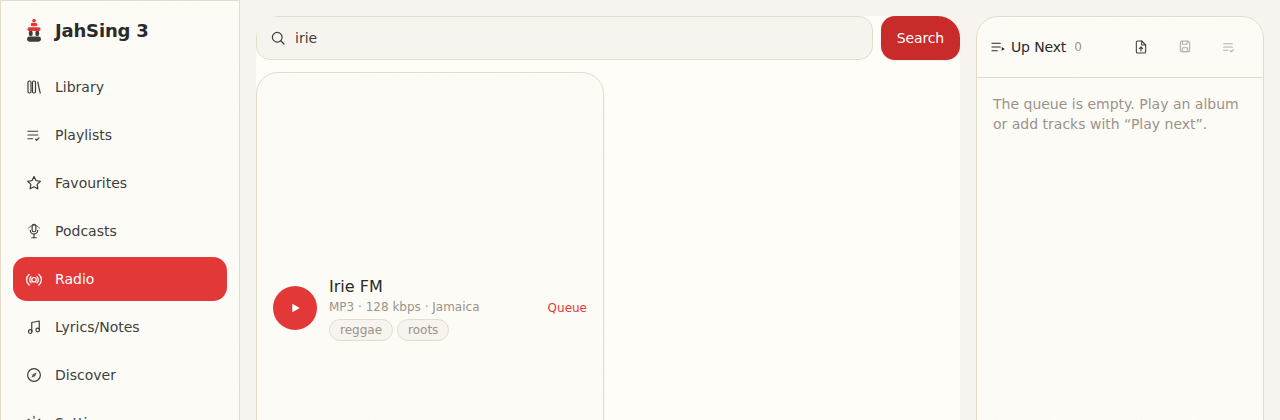
Each result has a round Play button and a Queue link. Play starts the station right away. Queue adds it to your Up Next list, so a station can sit in line like any other track. Under the hood, JahSing 3 also deals with a common annoyance. Many directories hand out small playlist files (ending in .pls or .m3u) instead of the stream itself. The app follows that file to the real stream for you, so you just press Play.
The mystery of the song title
A file on your computer carries its title inside it. A live stream has no such label, because the song is changing every few minutes. So how does your player display “Artist – Song” while a station is playing?
The answer is a simple, old trick with the nickname ICY metadata. “Metadata” just means information about the music. Here is how it works.
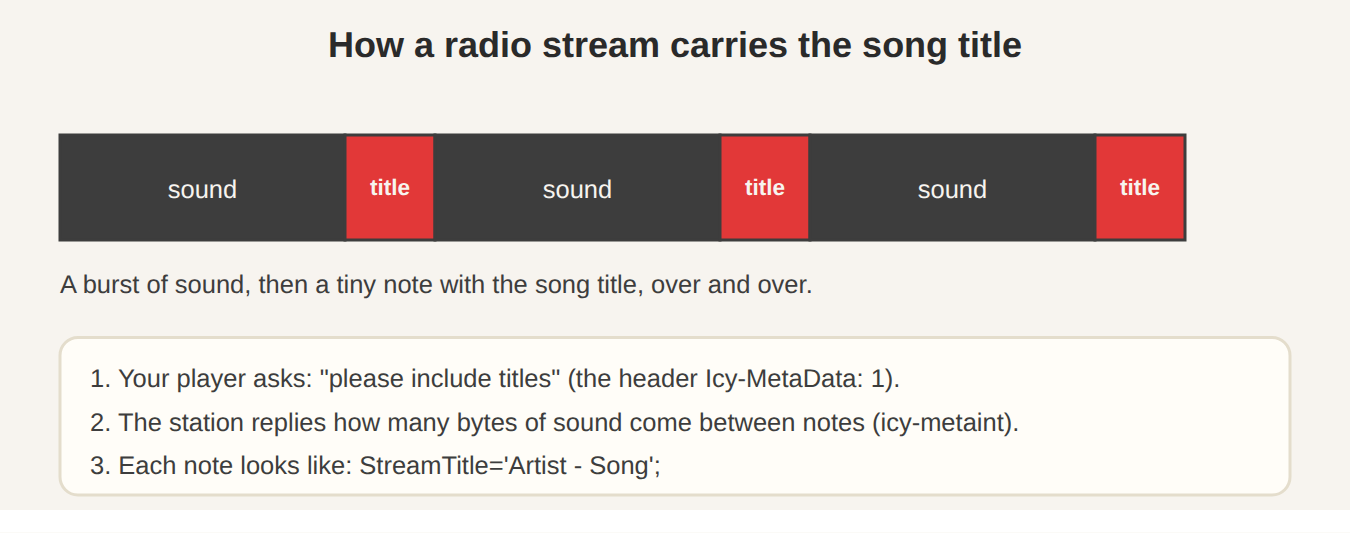
- Your player asks nicely. When it connects, it adds a request that says, in effect, “please include the song titles.” The technical name is the
Icy-MetaData: 1header. - The station agrees and sets the rhythm. It replies with a number, called
icy-metaint. If the number is 16,000, the station will send 16,000 bytes of sound, then a small note, then 16,000 more bytes of sound, and so on. - The note carries the title. It looks like
StreamTitle='Artist - Song';. The player pulls the note out, hides it from the audio, and shows you the words.
Why does the player have to ask? Because a note sent to a player that does not expect it would come out as a nasty crackle in the sound. Asking first keeps everyone safe. If you like reading the details, the developer pages for the icy library describe the same steps.
What JahSing 3 does with it
JahSing 3 includes a reader for this exact format. It turns a note such as StreamTitle='Artist - Song'; into a clean title for the Now Playing area, and it can also open a stream briefly to read the station’s own details, like its name, genre and bit rate, for the info panel. So when a station is on, you see what is playing without any effort.
Some stations send nothing, or send only their own name. That is not a fault in your player. It means the station chose not to share titles. In that case JahSing 3 offers Identify song, which listens to a short slice of the live audio and tries to name it. As with local files, Identify song is a JahSing Pro feature.
Tips for finding good stations
- Search by mood or place, not only by name. Words like “chill”, “roots” or a city can turn up gems.
- Look at the bit rate. Higher numbers usually sound better, though they use more data.
- Try several. Free streams come and go. If one is silent, it may have simply gone off the air.
- Save favourites. Queue the ones you love so they are easy to find again.
Wrapping up
Internet radio is free, huge and surprisingly simple underneath. A directory is the phone book, a stream is the tap, and ICY metadata is the little note that tells you what song is playing. With a good directory and a player that understands all three, you can wander the world of radio from your armchair.
Sources and further reading
- Radio Browser and its API documentation
- Community-ranked internet radio directories
- Submitting a station to internet radio directories
- icy: ICY protocol reference implementation
- Practical: A Shoutcast Server (explains the metadata format in detail)