Winamp Skins: Where They Came From, and How to Use Them in JahSing 3
If you used a computer around the year 2000, you probably remember Winamp. It was the little music player with the llama on the box, and half the fun was how it looked. You could change its whole appearance with a download called a skin. This article tells the story, shows you where to find skins today, and explains how to use them in JahSing 3.
A very short history of Winamp
Winamp was first released on April 21, 1997, by Justin Frankel and Dmitry Boldyrev at a small company called Nullsoft. It was free, light on your computer, and played MP3s well, which was exactly what people wanted at the time. Their name was a mash-up of “Windows” and “amp.”
The big step for looks came with Winamp 2.0, released in September 1998. It let people add custom skins, along with a better equalizer. A skin does not change what the player does. It changes how it looks, like swapping the case on a phone. This is told in this history of Winamp.
America Online bought Nullsoft in June 1999 for $80 million in stock. Winamp 3 came in 2002, and Winamp 5 in 2003 (the team joked that nobody wanted a “Winamp 4 skin”). In late 2013, AOL announced it would stop offering Winamp for download, and the original ended on December 20 of that year. By then, tens of millions of people had used it.
Why skins mattered
Skins let anybody become a designer. Fans made them for their favourite bands, films and video games, from The X-Files to Final Fantasy. Some looked like stereo equipment. Others looked like nothing a stereo ever looked like. Many were hard to read and hard to use, and people loved them anyway. One writer called the whole archive “a trip through time and bad design choices”.
Classic Winamp 2 skins are saved as files that end in .wsz. A skin is basically a bundle of small pictures: the buttons, the sliders, the number display and the window frame. The player slices up those pictures and puts them in the right places.
Where to find skins today
The best place is the Winamp Skin Museum, built by programmer Jordan Eldredge. It is a searchable, shareable view of the huge collection of skins saved on the Internet Archive, which holds well over 100,000 unique skins, including their readme files, according to this report from The Next Web. You can search, preview a skin right in your web browser, and download the file. Jordan also wrote about the project on his own site.
The same developer created Webamp, a version of Winamp 2 that runs in a web browser and can show all the classic skins.
A quick safety note: download skins from trusted archives, and keep them as plain skin files. A skin should only contain pictures and a small text file. If something that claims to be a skin asks you to run a program, do not.
Using skins in JahSing 3
JahSing 3 grew out of an older Java player called JahSing 2, and a nod to the Winamp look has been part of the family from the start. In JahSing 3 it is a full mode of its own. You switch from the regular window to a classic skinned player, and it shows the main window with its time display, song title, volume and balance sliders and the transport buttons, plus the equalizer and the playlist windows.
Here is how to try it:
- Open Settings in JahSing 3.
- Find the Classic skin card and press Enter skin mode. You can also press Ctrl + Shift + S (Cmd + Shift + S on a Mac).
- To wear a different look, press Choose skin and pick any
.wszfile you have downloaded. - To go back, use the same shortcut again, or the exit control in the skin window.
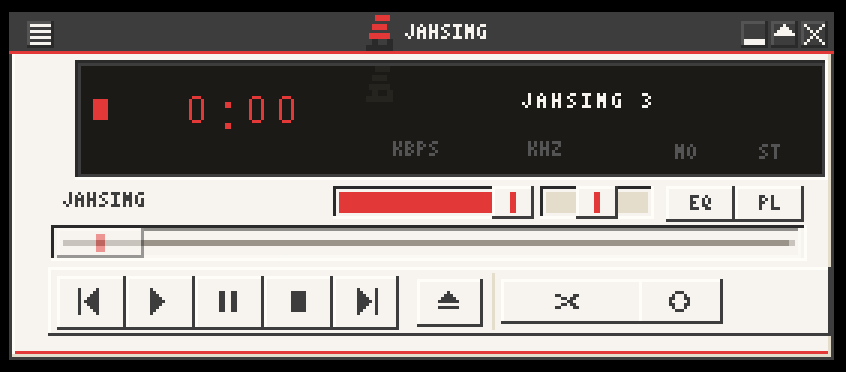
If you do not pick a skin, JahSing 3 uses its own, a cream and charcoal design with a red accent that matches the rest of the app. A second, plain skin also ships with the app as an alternative.
What works inside a skin
JahSing 3 opens the skin file right in the app and cuts its pictures into the right pieces for each control. The skinned player includes the main window, a compact “windowshade” version, the equalizer and the playlist. The scrolling song title can move in several different styles, which echoes the way old Winamp scrolled text across its display.
As with any recreation, a very unusual skin may not look exactly like it did in the original. Skins were written for one specific program, and some made odd choices. If one looks wrong, try another. There are thousands to choose from.
Why bother with a skin?
- It is fun. A bit of style makes a daily tool feel personal.
- It is nostalgic. Seeing a skin you used in 2001 can bring back a whole era.
- It is compact. The skinned player is small and tidy, handy when you want music without a big window.
Wrapping up
Winamp skins turned a plain music player into a canvas, and a whole community of artists kept that going for years. Thanks to museums like the Winamp Skin Museum, those designs have not been lost. With JahSing 3, you can load them again and give your music a face you chose yourself.