Equalizer Presets Explained: Rock, Classical, Pop and When to Use Each
An equalizer preset is a shortcut. Instead of moving ten sliders by hand, you choose a name and every slider jumps to a ready-made position. JahSing 3 has 18 of them. Many go back to the early days of Winamp, whose presets became a familiar list for a generation of listeners. This guide explains what each preset really does, in everyday terms, so you can pick one on purpose instead of by trial and error.
First, how to use a preset
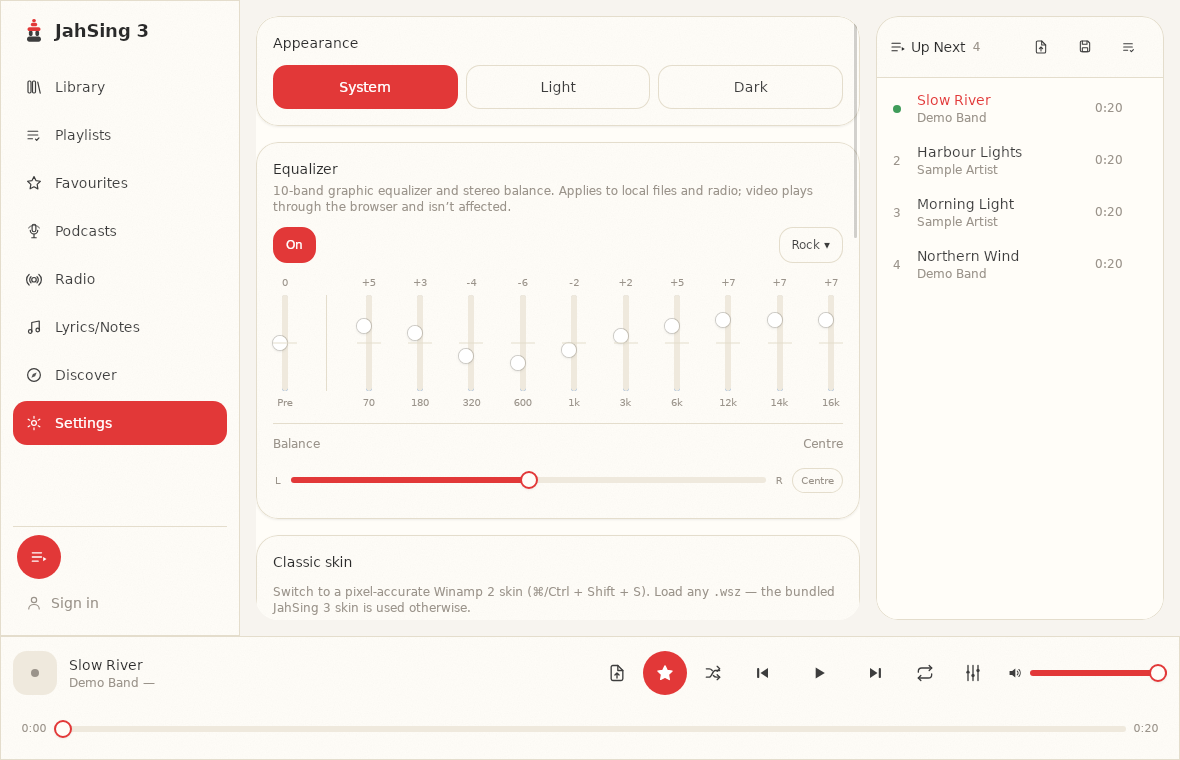
- Open Settings and find the Equalizer card, or click the equalizer button in the player bar.
- Switch the equalizer On. It starts switched off, and presets have no effect until it is on.
- Open the Presets menu (the button at the top right of the card) and pick a name.
After that, the button shows the preset’s name, and the sliders show its values. You can adjust any slider from there, and the original preset stays available in the menu. If you are new to the controls, our beginner’s guide to the equalizer explains each one.
How to read the shapes
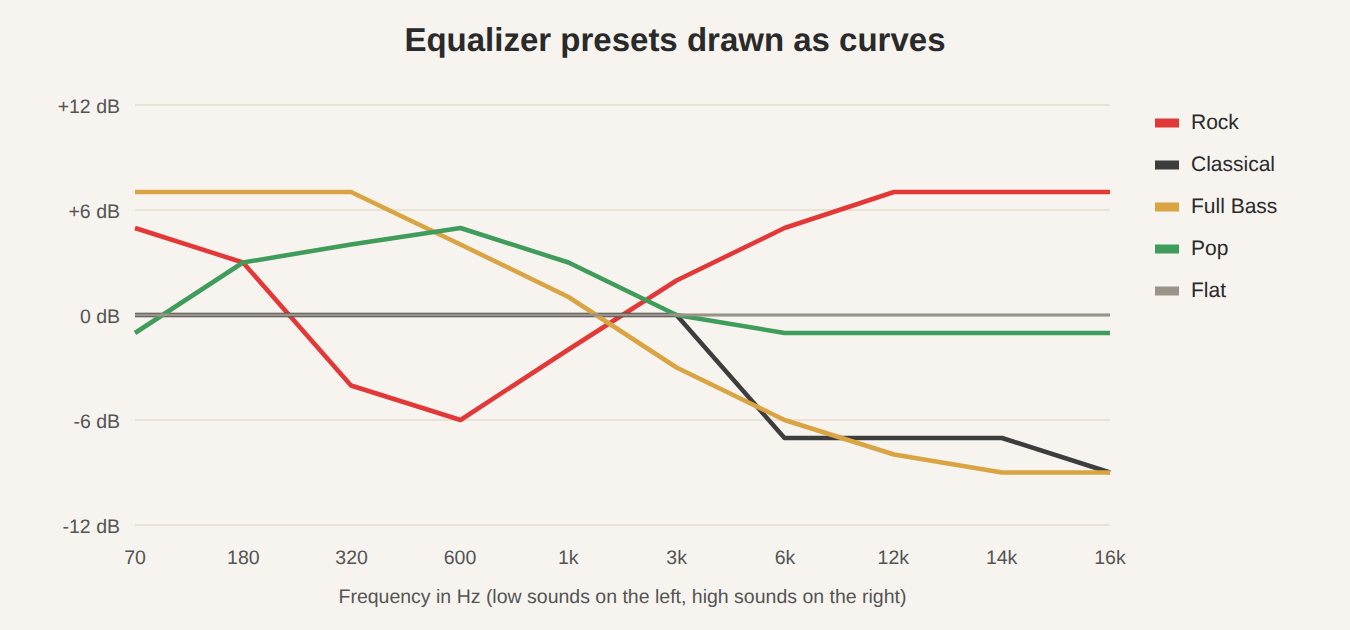
You do not need numbers to understand a preset. Look at its shape from left (low sounds) to right (high sounds):
- A hump on the left means more bass.
- A hump on the right means more treble.
- A “smile” (high at both ends, low in the middle) gives a lively, punchy sound.
- A dip on the right gives a softer, warmer sound.
The presets, one by one
The descriptions below come from the actual values in the app. The “good for” notes are suggestions. Your ears and equipment have the final say.
Flat
No change at all. Every slider sits at zero. Choose it to reset, or to hear the sound as it was recorded.
Classical
The low and middle sliders are left alone, and the highest four are pulled down, by 7 to 9 dB. The result is a softer, less bright top end. Good for: orchestral and acoustic music that sounds too sharp, or old recordings with a lot of hiss.
Club
A gentle lift in the lower middle, around 320 Hz to 3 kHz, with nothing extreme. It adds body and drive. Good for: pop and dance tracks on small speakers.
Dance
More bass, up to 6 dB at the bottom, and a cut of 4 to 5 dB in the upper middle (3 kHz to 12 kHz). The bass thumps and the sharp edges are rounded off. Good for: electronic and dance music at moderate volume.
Full Bass
A big boost at the low end (up to 7 dB) that steadily falls away, ending at 9 dB below flat at the top. It is heavy on bass and gentle on treble. Good for: bright, thin-sounding speakers or headphones. It is not good for bass-heavy music on speakers that already boom.
Full Bass & Treble
A deep smile: bass up about 6 dB, treble up to 9 dB, and the lower middle pulled down 6 dB. It sounds very exciting for a while and tiring over time. Good for: quiet listening, when music can sound dull. Many people find it works best at low volume.
Full Treble
The opposite of Full Bass: the lowest bands are cut by 9 dB and the highest are boosted by 10 or 11 dB. Good for: muffled recordings or dull speakers. It can be harsh, so use it with care.
Headphones
Raises the deep bass (a lot at 180 Hz) and the high end, with a small dip around 600 Hz and 1 kHz. It is meant to counter the way some headphones sound thin. Good for: small, light headphones and earbuds. Try it, and switch it off if it sounds overdone.
Large Hall
Strong bass (up to 8 dB) and a cut of about 4 dB in the 3 kHz to 12 kHz range. It gives a big, rounded, roomy impression. Good for: orchestral and film music, or anything you want to sound grand and spacious.
Live
A small cut in the deepest bass, and a mild lift of 2 to 4 dB through the middle and upper middle. It adds presence and clarity. Good for: live recordings and music with prominent vocals.
Party
A smile with bass and treble both up 5 dB and the middle left alone. Simple and punchy. Good for: background music at a gathering, where energy matters more than subtlety.
Pop
A gentle lift of 3 to 5 dB in the lower mids (180 Hz to 1 kHz), and a tiny cut at the very top. It emphasises vocals and warmth. Good for: pop, singer-songwriter and radio-style music.
Reggae
The only strong moves are a dip of 4 dB at 600 Hz and a lift of 4 dB at 3 and 6 kHz. The empty middle gives space for bass lines and guitar skank. Good for: reggae and similar styles with a clear, open sound.
Rock
A classic smile: bass up 5 dB, treble up 7 dB, and a dip of 4 to 6 dB at 320 to 600 Hz. Good for: guitar-driven music, and a quick fix for flat-sounding mixes.
Ska
Reduces the bass slightly (2 to 3 dB) and raises the highs steadily, up to 7 dB. The sound is bright and sharp, which suits horns. Good for: ska, brass and anything where you want bite.
Soft
Lifts the upper end gently, from about 2 dB at 3 kHz to 8 dB at 16 kHz, and adds a small bass boost. Despite the name, the main effect is added sparkle. Good for: quiet, mellow music that sounds dull.
Soft Rock
Mild bass (3 dB), a small dip in the mids (2 to 3 dB), and a lift of 5 dB at the very top. Good for: mellow rock, acoustic and folk.
Techno
Bass up 6 dB, mids pulled down 3 to 4 dB, and treble up 6 to 7 dB. A strong smile. Good for: electronic music with heavy beats and bright synths.
What about speech?
JahSing 3 does not have a preset for talk, such as podcasts or audiobooks. If you want one, you can make your own. Start from Flat, then lift the 1k and 3k sliders by about 2 to 3 dB, which helps the voice stand out, and lower the 70 Hz slider a little to reduce rumble. The sliders keep your adjustments, so they stay in place until you change them.
Some honest advice about presets
- Presets are starting points, not answers. They were made for typical music and typical speakers. Yours may differ.
- Compare with the switch. Always flip the equalizer off and on to check the preset improves things for the song you are playing.
- Beware of “more is better.” Presets with big moves, such as Full Treble, can be tiring. Gentler ones like Pop, Live and Soft Rock are easier to live with.
- Check the loudness. A preset that boosts a lot can distort. Pull the Pre slider down a few dB if it does.
- Different music, different preset. It is fine to change presets for each album.
Where the presets come from
The JahSing 3 preset list can be described as “classic graphic-EQ presets.” Many JahSing3 listeners recognize the names from other legacy players. You can read more about the player’s background in our article on Winamp skins. JahSing 3 limits every slider to a range of minus 12 to plus 12 dB, and the presets sit within that range.
In short
Eighteen presets give you eighteen starting points. Learn to read the shape, try the ones that match your music, and always compare with the equalizer switched off. You can download JahSing 3 from the Downloads page.
Sources: Winamp (Wikipedia); Equalization (Wikipedia); the JahSing 3 equalizer presets (app source and Settings page). Descriptions of the “good for” cases are suggestions.