Lossless vs Lossy: A Plain-Language Listening Test You Can Try at Home
People argue about this all the time. One side says lossless music sounds richer and more alive. The other says nobody can tell the difference once a lossy file is made well. Rather than take anyone’s word for it, you can find out for yourself in about twenty minutes. This guide shows how to set up a fair test at home using JahSing 3 and a few copies of one song.
First, what are you comparing?
A quick reminder of the terms. A lossless file (such as FLAC) keeps everything from the original recording. A lossy file (such as MP3 or AAC) discards some detail to get smaller. The more aggressively it shrinks, the more it discards. A 128 kbps MP3 is quite small and loses more; a 320 kbps MP3 is larger and loses far less. Our guide to choosing an audio format goes through the basics.
The question this test asks is simple: can you tell which is which, when you cannot see the label? That last part is vital. If you know you are listening to the “high quality” file, your brain tends to hear it as better. Researchers call this expectation bias, and it fools almost everyone, so a fair test has to hide the labels.
What you will need
- A song you know very well, ideally one with detail: acoustic instruments, cymbals, voices, space. Dense, loud rock hides differences, while gentle, spacious recordings reveal them.
- A lossless copy of it. If you ripped the CD to FLAC, you already have one.
- Lossy copies of the same song. You can make these with any free audio converter. Audacity, for example, can open the lossless file and export it as MP3 at different quality settings. Make a 128 kbps copy and a 320 kbps copy.
- Decent headphones or speakers. Ordinary laptop speakers will hide most differences. Wired headphones are a good choice.
- A helper, if possible, to remove any chance of cheating yourself.
Step 1: Make the copies look the same
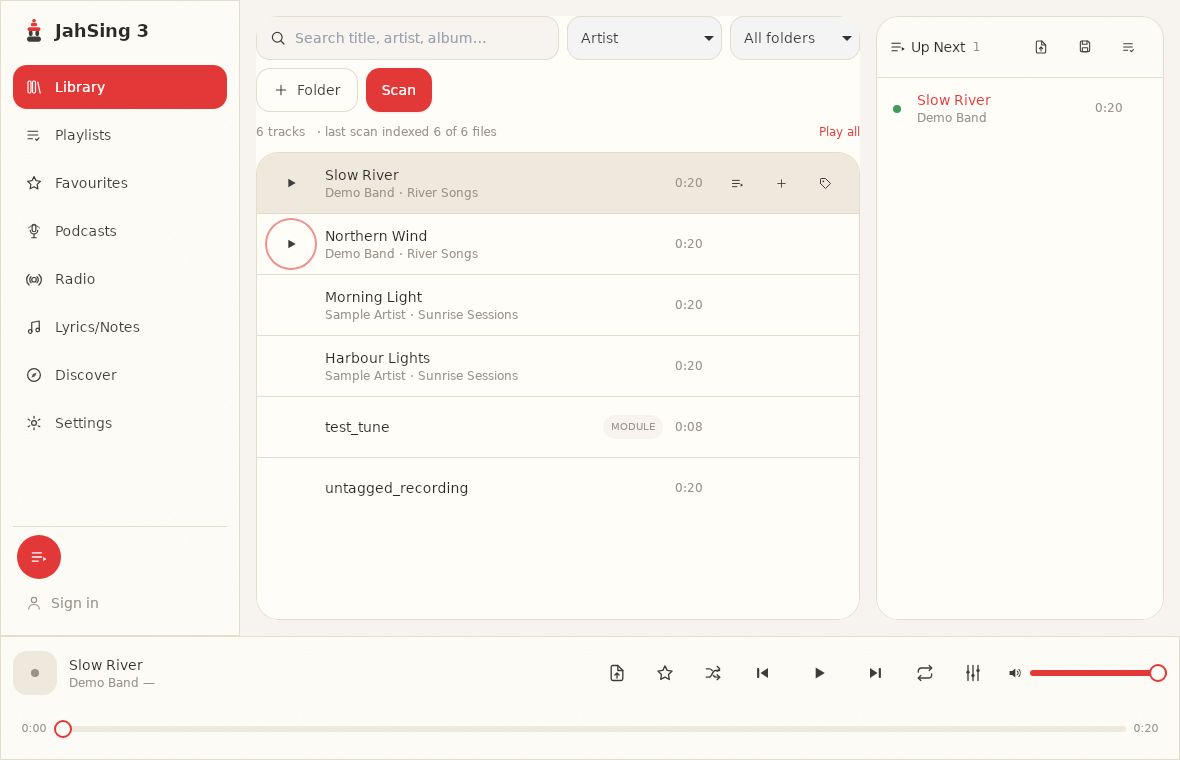
Put the three files in a new folder. The tag editor in JahSing 3 is useful here, because it lets you rename how each file appears in the library. Hover over each file, click Edit tags and give them neutral titles: “Sample A,” “Sample B” and “Sample C.” Work on the copies only. Do not edit your master file.
Ask your helper to do this for you, and write down which sample is which on a piece of paper that you do not look at yet. If you are on your own, mix up the order, label them, and make a note, then look away from the note until the end.
Step 2: Check the player is set up fairly
- Turn the equalizer off. It is under Settings and in the small equalizer pop-up from the player bar. The switch should read Off.
- Keep the volume the same for all three. A louder file will almost always sound better to you, and the lossy copies can end up slightly different in volume.
- Avoid distractions. A quiet room helps.
Step 3: Listen in short bursts
- Pick a short section, around 20 to 30 seconds, with plenty going on. Choose the same section each time.
- Play the section from Sample A, then Sample B, then Sample C. Take brief notes on anything you hear differently: sharper cymbals, a flatter voice, less space around the instruments.
- Repeat in a different order. A helper can queue them in random order for you.
- Guess which sample is the lossless one, and which is the 128 kbps copy. Write down your guesses.
Repeat the exercise at least ten times, mixing up the order. One lucky guess proves nothing. If you get it right eight or nine times out of ten, you probably can hear a difference. If you are right about half the time, you are guessing.
Step 4: Peek at the answers
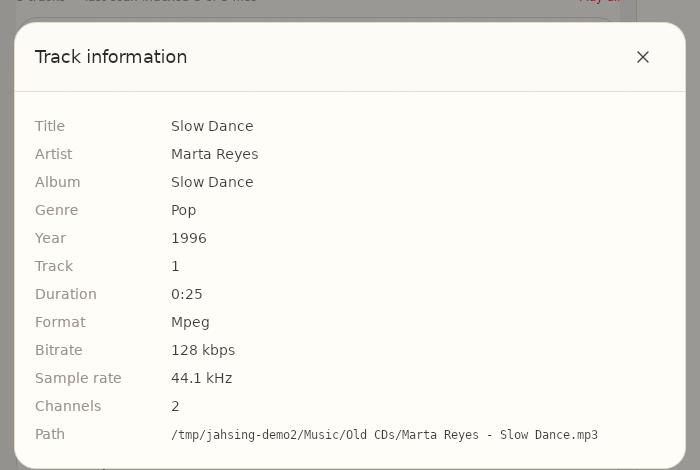
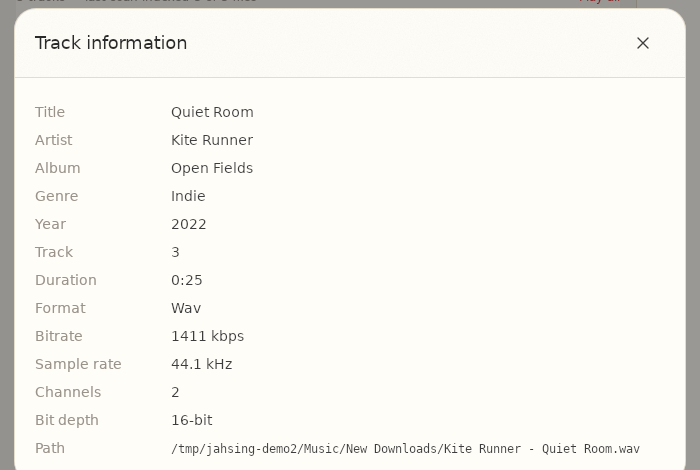
When you finish, check your note, and use JahSing 3 to confirm what each copy really is. Add a file to the queue, open the item’s menu and choose Information. The window shows the format and bitrate. Here are two examples from a set of sample files made for this article.
What the results usually show
Results vary from person to person, but a few patterns come up again and again:
- 128 kbps MP3 versus lossless: many people with good headphones can tell the difference on detailed music, especially in cymbals and quiet passages.
- 320 kbps MP3 versus lossless: most people cannot reliably tell them apart. If you can, that is a genuine ability, but it is not common.
- Your gear matters. A cheap speaker or noisy room hides differences. Better equipment reveals them.
- Your ears and age matter. Hearing changes over time, particularly for very high sounds.
So what should you do with your result?
If you could not tell 320 kbps from lossless, then smaller files are a perfectly sensible choice for your library, and you can enjoy the saved space. If you could hear the difference, it makes sense to keep your important albums in a lossless format like FLAC. Many people take a middle path: lossless for albums they love and care about, and compact files for everything else.
There is no prize for hearing more than you do. The best format is the one you will actually enjoy, on the equipment you actually use. Try the test with your own music, and trust what you find rather than what a forum says.
JahSing 3 plays all the formats used here. You can download it from the Downloads page.
Sources: Lossy compression (Wikipedia); Lossless compression (Wikipedia); ABX test (Wikipedia) for the idea of blind comparison; Fraunhofer IIS on mp3; JahSing Features.