Finding Stations From Another Country: Discovering World Radio
Old-fashioned radio stops at the edge of its transmitter’s range. Internet radio has no such edge. A station in New Orleans, one in Nairobi and one in Nuuk are all just web addresses, and any of them can play on your computer. That makes internet radio a great way to hear music, languages and local flavor from places you may never visit. This guide shows how to go looking for stations from other countries using JahSing 3, and how to make sense of what you find.
Where the station list comes from
JahSing 3 does not keep its own list of stations. Its Radio page searches a free, public directory called radio-browser.info, which is a community-maintained collection of internet radio stations from around the world. The page’s own text puts it simply: “Search the public radio-browser.info directory. Streams play through the same engine as local files, with live ‘now playing’ metadata.”
Because the list is run by a community, it is large and always changing. New stations get added and dead ones are marked as broken. When you search, JahSing 3 asks the directory to hide stations that are known to be broken, and puts the most popular, by votes, at the top.
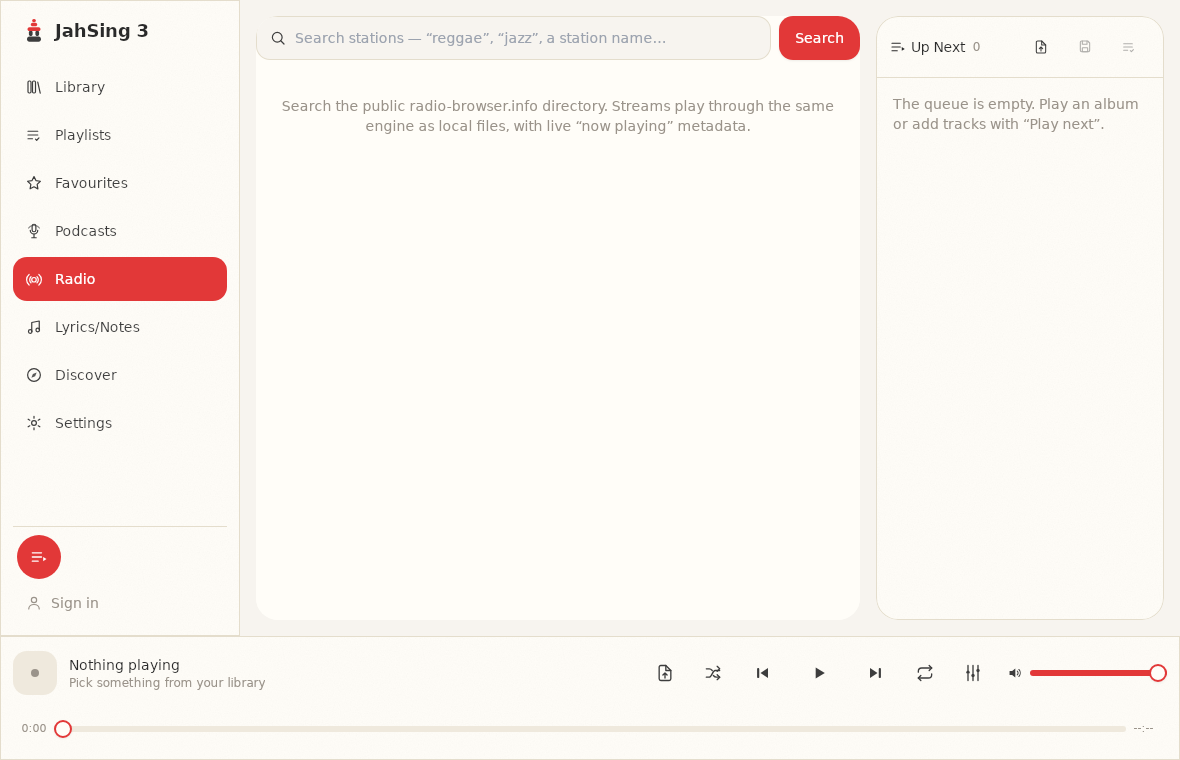
How to search
- Click Radio in the list on the left.
- Click the search box. The hint reads: “Search stations, ‘reggae’, ‘jazz’, a station name…”
- Type a word and press Search.
The hint suggests a style of music or a station name. One thing to know: the search looks for your word in the name of the station. A search for “jazz” finds stations with “jazz” in their name, and a search for a city, such as “Lisbon” or “Nairobi,” finds stations that have the city in their name. A station that plays jazz but does not say so in its name will not turn up. So think about the words broadcasters really put in their names: styles (jazz, reggae, classical), places (cities and regions), and tags like “FM,” “radio” or “live.” The directory is a global one, so you will often see results from several countries mixed together.
Reading a result
Each result is shown as a card. Here is what is on it.
- The station name in bold.
- A line of details. This shows the audio format (often MP3 or AAC), the bitrate in kbps, and the country, separated by dots. For example, “MP3 · 128 kbps · Jamaica.”
- Little tags. Up to four labels describing the style of programming, such as “reggae” or “roots.”
- A round play button on the left, and a Queue link on the right, which adds the station to your queue without interrupting what is playing.
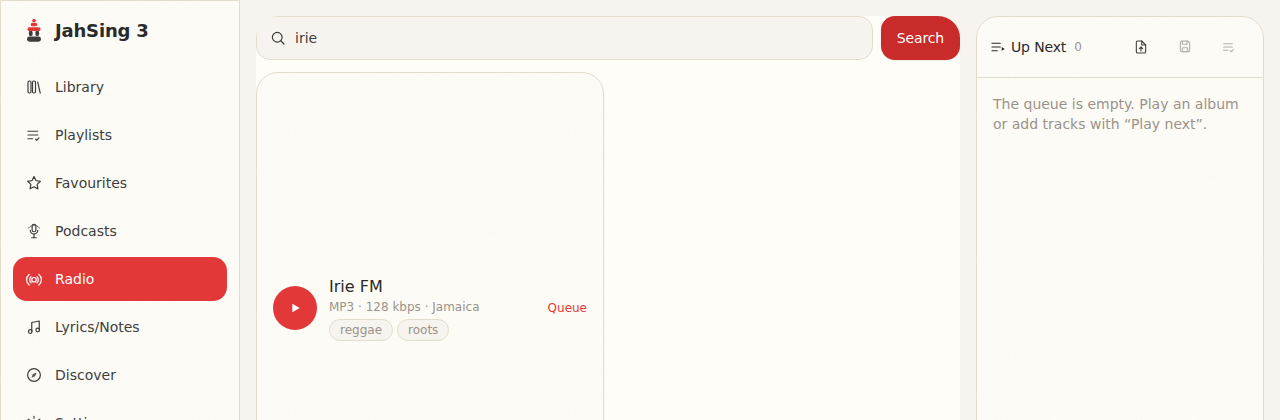
That country label is what makes world radio easy. Look for names of countries in the detail line, and you can build a short tour by picking one station from each.
Tips for finding good stations abroad
- Search for a city or station name you already know. Famous broadcasters often have an internet stream.
- Try a local-language word. Stations abroad often use their own words in their names, such as “radio” in other languages, “fm” or the name of a region.
- Look at the bitrate. A station at 128 kbps usually sounds good enough for everyday listening. Very low numbers are often talk stations. Our article on what bitrate means on a radio station explains the trade-offs.
- Watch the tags. They hint at what is actually playing. A station tagged “news” will not be a good choice for dancing.
- Do not give up on the first try. If a station does not start, try the next card. Some are offline or overloaded.
Things that can get in the way
Language
The announcers will often speak the local language. That is part of the charm, and for music stations you will barely notice. For talk, you may need a translation tool, or you can stick to music.
Time zones
A station’s “morning show” is on at its own morning. If you tune in to a Tokyo station at night in London, you will hear whatever is on in the middle of the Japanese day. It is more fun than it sounds. You get to eavesdrop on a different time of day.
Regional restrictions
Some stations only allow listeners from their own country, because of music licensing. These may fail to play, or may play a short message and stop. This is not something the player can fix. Move on to another station.
Stations that vanish
Directories are only as fresh as their volunteers. A station can close and still appear for a while. If the play button gives an error, try another.
Your connection
Streams come from the internet, so a poor connection causes dropouts. Pick a lower bitrate if your connection is weak.
Keeping the ones you like
When you find a station you enjoy, use Queue to add it, and then save the queue as a named playlist. A “World radio” playlist full of stations is a nice thing to have. Because stations are treated as items like any other, they can sit beside local songs in a queue. If you need to copy a list to another computer, you can export the playlist to a file. See our guide to playlist habits for ideas.
If a station you love is not in the directory, you can add it by hand, provided you have its playlist file or a link. Our beginner’s guide to stream links and playlist files shows how.
Respect and a little curiosity
Many of these stations are run by small groups or volunteers, and they depend on listeners. If you like one, tell a friend, or visit its website. Some of them also welcome donations.
A small tour to try
Here is a simple plan for an evening of world radio. Search for one word from each of the following, and pick the first station that works:
- “Reggae,” to find stations that name the style, many of them in Jamaica and Europe.
- “Jazz,” for stations around the world that name their music.
- “Lisbon,” “Nairobi” or any city you are curious about.
- “Classical,” for concert-style programs.
- “Latina” or “Latino,” for Latin music stations.
Use Queue to line them up, and switch between them as the mood takes you. Results depend on what is in the directory on the day, so treat this as a starting point.
In short
JahSing 3 turns the world into a radio dial. Search for a style or a name, read the country and bitrate on each card, and press play. You can download JahSing 3 from the Downloads page.
Sources: radio-browser.info; JahSing Features; the JahSing 3 app’s own help text. The station search was not run live for this article, so check the examples above against what you see.